
BLOCKS: Quiz Block
What is the Quiz block?
The Quiz block lets you drop one of your published Quizzes straight onto a Portal Page or a Public Page in the Content Block Editor. Whoever opens the page takes the Quiz right there, one question at a time, in the same player used everywhere else in the product. The page only points at what you published in the Quizzes area, so there is nothing to rebuild or edit on the page itself.
This joins the Quiz's other homes: the Quiz Form on a public link, and the Quiz step inside a FLOW.
How do I add a Quiz to a page?
- Open the page in the Content Block Editor. The Quiz block is offered on Portal Pages and Public Pages, and nowhere else.
- Add a block and choose Quiz. It is listed in the block picker as Quiz, described as "Let people take a published Quiz".
- Pick a published Quiz. The Select Quiz list offers only your own account's published Quizzes. Drafts and archived Quizzes are not offered.
- Choose whether to allow retakes. Allow retakes is on by default.
- Save the page. Targets and visitors can now take the Quiz in place.
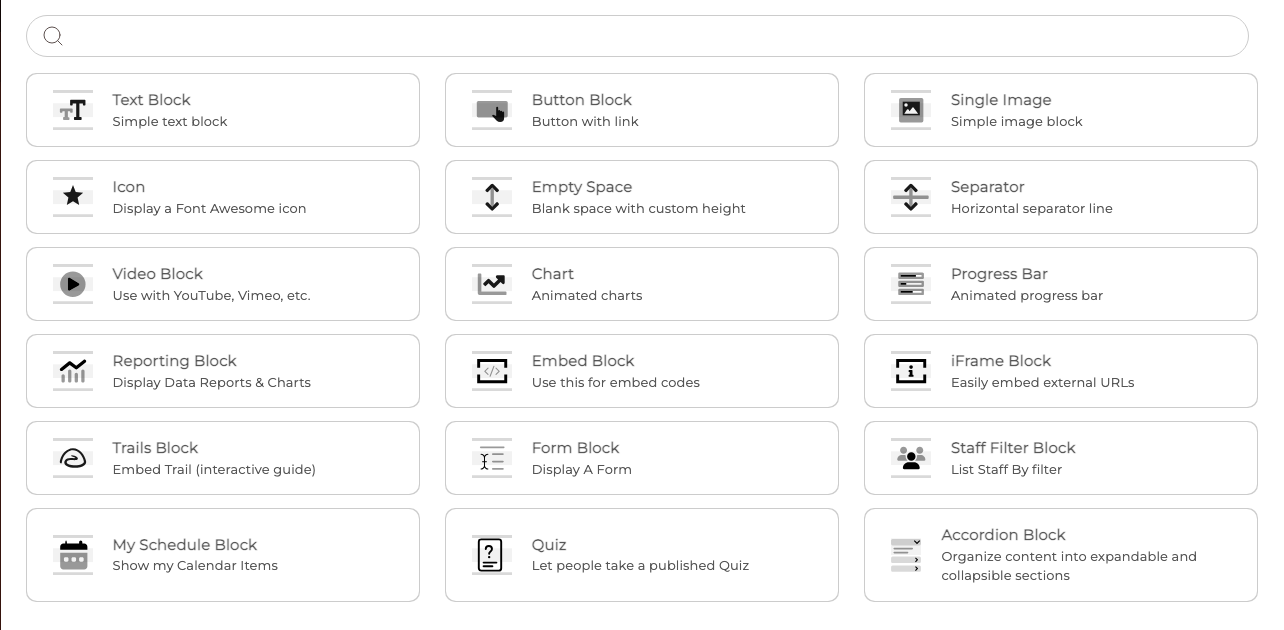
The block has no title or intro of its own, so it simply presents the Quiz you chose. Its Styling and Access panes work exactly as they do on any other block.
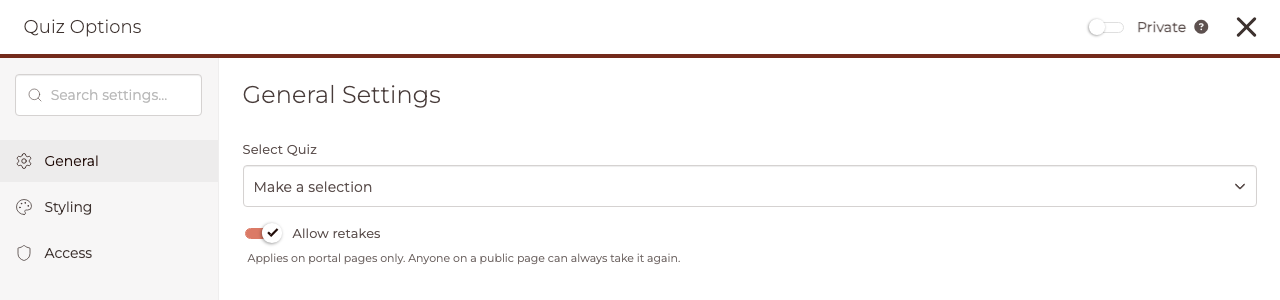
IMPORTANT: Allow retakes applies on Portal Pages only. Anyone on a Public Page can always take the Quiz again, whatever the switch says.
TIP: In the editor the block shows the Quiz's own first screen as a sealed preview. It never plays there and never records a run, so you can lay the page out freely. A Staff member who is not allowed to place Quizzes sees the Quiz's name instead of the preview.
What happens when a Target takes it on a Portal Page?
On a Portal Page the taker is a signed-in Target, so the attempt is theirs. They can start it, leave, and resume it from any device, with one open attempt at a time. Finishing scores it on the platform's side against the Quiz's passing score and shows the Quiz's own completion screen.
If you allowed retakes, a Target who has finished can start a fresh attempt and every attempt is kept. If you did not, they see their result and cannot start again. Who can open the page, and the block's own Access settings, decide who can take it.
What happens when a visitor takes it on a Public Page?
On a Public Page the visitor is usually a stranger with no account, so the Quiz plays in place, they see their result, and they can resume on the same device and browser. No contact details are ever collected: the run carries nothing that could name the person.
The finished run is kept for your records as Anonymous, or under their name when a signed-in Target of your account takes it. A run somebody starts and walks away from is not a result, and is cleared after 30 days.
IMPORTANT: This block is not a lead-capture tool and never asks a visitor for their name or email. If you want a stranger's details and to turn them into a Contact carrying their score, use a Quiz Form instead.
Where do I see who took the Quiz?
Open the Quiz in the Quizzes area and choose its Pages results view. It lists the finishes from your pages together: Portal Page attempts naming the Target and the page they took it on, and Public Page finishes listed as Anonymous or by name.
You can filter by page or search for a person, and retakes appear as separate lines, numbered Attempt 1, Attempt 2 and so on. Seeing this view needs the View quiz results & analytics permission, the same one the Quiz's other results views need.
Each Quiz block is its own placement, so the same Quiz on two pages, or twice on one page, keeps separate histories. Results are never lost if you later delete the page: the line stays and the page is shown as a deleted page.
What if the Quiz is changed or removed?
If the Quiz a block points to is no longer published, viewers see This quiz is no longer available in the block's place, and the editor tells you This quiz is no longer published. Pick another to show here. A page copied from another account shows a matching notice asking you to pick one of your own. Attempts already recorded are never deleted.
If people are mid-attempt when you save a change to the Quiz, the editor warns you first and tells you how many are affected. Saving restarts each attempt on the updated Quiz, discards the answers given so far, and each person is told their attempt was reset because the Quiz changed.
CLICK HERE to learn more about building Quizzes.